




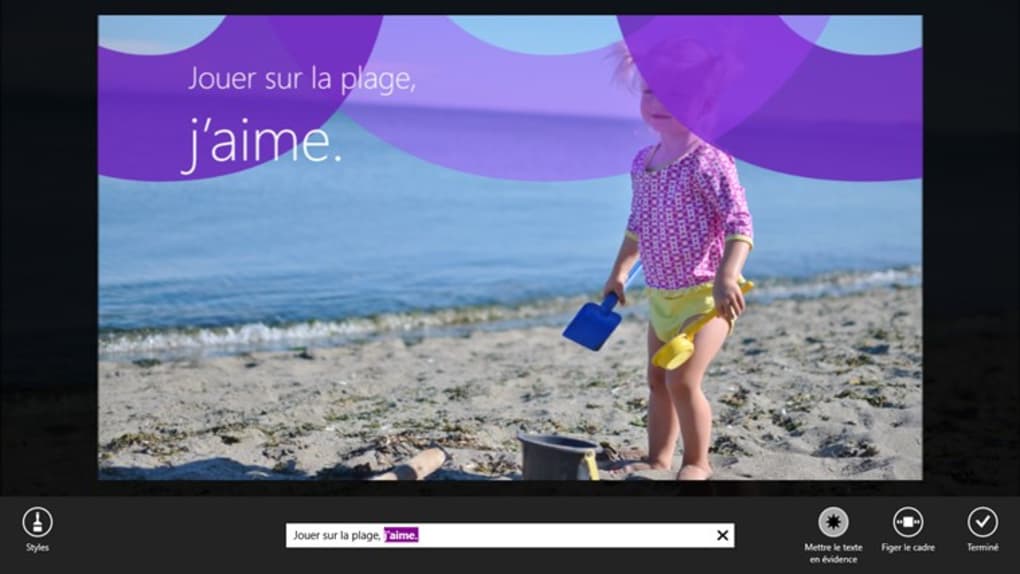


Description
Download Movie Moments – Free Screen Capture & Video Editing Tool for Windows
Discover Movie Moments, a free and lightweight screen capture and video editing tool designed exclusively for Windows users. Developed by Microsoft Corporation, this software offers a simple yet powerful solution for capturing and editing screen activity. Whether you're creating tutorials, documenting software issues, or preserving memorable video moments, Movie Moments delivers a smooth experience without the complexity of professional-grade tools. With support for multiple languages including English, Spanish, and German, it's accessible to a global audience. Although the last update was in 2013, the software remains stable and functional on modern Windows systems, including Windows 8.1 and earlier versions. It’s a trusted choice for users who value simplicity, security, and ease of use. With over 37,000 downloads since its launch, Movie Moments continues to be a reliable option for quick screen recording and basic video editing. Download now and experience a no-frills, secure way to capture and share your digital moments.
Simple yet Powerful Screen Capture & Video Editing Features
Movie Moments stands out in the crowded field of screen capture software by offering a streamlined interface and essential tools that prioritize user experience. Unlike many complex video editing suites, this tool focuses on core functionality—recording your screen, trimming clips, and sharing content—without overwhelming beginners. The software allows you to capture your entire screen or a specific window with just a few clicks, making it ideal for creating quick tutorials, showcasing app features, or documenting online meetings. One of its standout features is the ability to record audio from your microphone and system sound simultaneously, which is perfect for narrated walkthroughs or gameplay videos.
After recording, Movie Moments provides basic video editing tools such as trimming, splitting, and adjusting playback speed. These features, while not advanced, are sufficient for removing unwanted segments and refining your final output. The software also supports exporting videos in widely compatible formats like WMV and MP4, ensuring seamless sharing across devices and platforms. Another notable feature is the ability to add simple captions and text overlays, which helps highlight key points in your video. While it lacks advanced effects or transitions, its simplicity makes it perfect for users who want a no-fuss solution.
Additionally, Movie Moments integrates well with Windows’ native file system, allowing you to save and organize clips directly in your preferred folders. It also includes a built-in preview window so you can review your recordings instantly before exporting. The software is lightweight, consuming minimal system resources, which means it won’t slow down your computer even during long recording sessions. Whether you're a student, educator, or casual user, Movie Moments delivers reliable performance with a minimal learning curve. Its clean design and intuitive controls make it a top choice for anyone looking for a secure, free, and easy-to-use screen capture tool.
- Record screen with audio (microphone & system sound)
- Trim and split video clips
- Adjust playback speed and add basic text overlays
- Export in WMV and MP4 formats
- Lightweight and low system resource usage
- Simple, intuitive interface for beginners
Easy Installation & Seamless Usage on Windows Devices
Getting started with Movie Moments is straightforward, especially for Windows users. Since it’s a standalone application developed by Microsoft, there’s no need for complex setup processes or third-party dependencies. To begin, visit the official Microsoft download page or a trusted software repository, locate the Movie Moments installer, and run it. The installation process is quick—typically taking less than a minute—and requires no configuration. Once installed, the app appears in your Start menu, and you can launch it with a single click.
Upon opening, the interface is clean and minimal, with clearly labeled buttons for recording, pausing, and stopping. The main screen displays a live preview of your selected area, and you can easily switch between full-screen and window capture modes. To start recording, simply click the “Record” button and choose your audio sources. The software automatically begins capturing everything on screen, and you can stop at any time by clicking the stop icon. After recording, the app opens a built-in editor where you can trim the beginning or end of your video, adjust the speed, or add text labels.
One of the biggest advantages of Movie Moments is its compatibility with older Windows systems. It runs smoothly on Windows 8.1 and earlier versions, making it a great option for users still on legacy systems. While it’s not available for Mac, Android, or iOS, Windows users have full access to its features without needing a subscription or additional plugins. The software doesn’t require internet access to function, which enhances privacy and security. You can record sensitive content without worrying about data uploads. Furthermore, since it’s free and open for download, there are no hidden costs or in-app purchases to manage.
For those who prefer not to install software, Movie Moments can be run from a USB drive, making it portable and ideal for use on multiple devices. This feature is especially useful in educational or corporate environments where users may need to record content across different machines. Overall, the combination of ease of installation, low system demands, and consistent performance makes Movie Moments a dependable tool for everyday screen recording needs.
Compatibility, Pros & Cons, and Frequently Asked Questions
Movie Moments is specifically designed for Windows operating systems, with full support for Windows 8.1 and earlier versions. It is not available for macOS, Android, or iOS, which limits its accessibility for cross-platform users. However, for Windows users, especially those on older systems, it remains a viable and stable option. The software does not require a powerful processor or high RAM, making it suitable for low-end machines. Despite its age, it continues to function without crashes or bugs on compatible systems.
- Pros:
- Free to download and use
- Lightweight and fast performance
- Simple interface ideal for beginners
- Supports audio recording during screen capture
- No ads or in-app purchases
- Cons:
- No updates since 2013
- Not compatible with Windows 10/11
- Limited editing features
- No cloud integration or sharing options
- Only available for Windows
Frequently Asked Questions (FAQ)
Is Movie Moments free to download?
Yes, Movie Moments is completely free to download and use. There are no subscription fees, hidden charges, or trial limitations. It’s a genuine free tool provided by Microsoft for Windows users.
Can I use Movie Moments on Windows 10 or Windows 11?
Unfortunately, Movie Moments is not officially supported on Windows 10 or Windows 11. It was designed for Windows 8.1 and earlier, and while some users report it runs via compatibility mode, Microsoft does not guarantee functionality on newer systems.
Does Movie Moments support recording system audio?
Yes, Movie Moments allows you to record both your microphone input and system audio simultaneously, making it ideal for narrated tutorials, gameplay videos, or online presentations.
What video formats does Movie Moments export?
The software exports videos in WMV and MP4 formats, both of which are widely supported across devices and platforms, ensuring easy sharing and playback.
Can I edit my recordings after capturing them?
Yes, Movie Moments includes basic editing tools such as trimming, splitting, adjusting playback speed, and adding text overlays. While not as advanced as professional tools, these features are sufficient for quick edits.
Conclusion: A Reliable Free Tool for Windows Screen Capture
While Movie Moments may be an older tool, its core functionality remains relevant for users seeking a simple, secure, and free screen capture and video editing software on Windows. Its lightweight design, intuitive interface, and lack of ads make it a trustworthy choice for students, educators, and casual users. Though it hasn’t received an update since 2013 and isn’t compatible with Windows 10 or 11, it continues to perform reliably on supported systems.
If you’re still using Windows 8.1 or earlier and need a no-frills way to record your screen with audio and basic editing, Movie Moments is worth downloading. It’s a safe, free, and efficient tool that delivers exactly what it promises—without distractions. For users on newer systems, consider alternatives like LightShot or oCam, but for legacy Windows environments, Movie Moments remains a solid option.
Download Movie Moments today and start capturing your digital moments—fast, free, and securely.
Guides & Tutorials for Movie Moments
How to install Movie Moments
- Click the Preview / Download button above.
- Once redirected, accept the terms and click Install.
- Wait for the Movie Moments download to finish on your device.
How to use Movie Moments
This software is primarily used for its core features described above. Open the app after installation to explore its capabilities.
User Reviews for Movie Moments 0
No reviews found





